Protect Your Account

Protect Your Account
Protect Your Account
Hackers are creating more personalized, targeted attacks to trick you into sharing information you shouldn’t. By protecting your account, you’re protecting the entire Rowan community. Just one compromised account can lead to campus-wide disruptions. Together, we can create a safer digital environment.
Account Security Basics
 Take your security training for a chance to win an iPad
We're giving students who complete their security awareness training in October a chance to win an iPad Air. Finish your training, and you’ll be automatically entered into the drawing.
Start with these three steps to keep your information safe. Then jump to the guidance below to learn how to spot online threats.

Create Strong Passwords
Make them long. Make them complex. Make them unique.

Use Two-Factor Authentication
Add an extra layer of security to your online accounts.

Take Security Training
Learn how to spot online threats and common scams.
Spot Online Threats
Learn the red flags to look for when you receive a suspicious email or land on an unknown website.Email Scams
Avoiding Phishing Scams
If you receive an email you weren’t expecting that includes a link, stop and think before you click.
- Check Known Scams: If the email seems suspicious, check go.rowan.edu/scams to see if it’s a scam we’ve identified. If it’s listed, delete it. If it's not, move to step 2.
- Look for Red Flags: Use our tips for spotting phishing scams to further review the email. In particular, take extra precaution when deciding whether to click on a link or take another action in response to a message that has been marked as [EXTERNAL]. The label is applied to emails sent from non-Rowan University email addresses in order to flag potential phishing scams, most of which originate with external senders. Keep your eye out for these common scams:
- Job offer scams: High pay for a few hours of work? It’s a trap. Don’t accept job offers that require depositing checks into your account and wiring money to other people or buying gift cards.
- Free giveaways: Offered a free baby grand piano? Likely a scam. Do not reply.
- Account scams: Told you have to verify your account or your email will be deleted? Don’t click. Check with the supposed source of the message first.
- Honor society scams: Research these groups before you respond or pay any fees.
- Gift card scams: “Are you available?” = scammer in disguise. Don’t reply, send money or purchase gift cards.
7 Ways to Spot a Phish
Don't be the catch of the day! Fortify your online safety net, and protect your personal information and hard-earned money, by learning how to spot a scam using our tips below.
Malware & Malicious Websites
Avoiding Malware
Short for malicious software, malware can be used to steal personal information, send spam and commit fraud. To protect your computer from malware, install antivirus software. You should also:
- Be careful about which websites you visit. File sharing sites and sites that allow you to illegally watch movies are ripe with contaminated programs that may infect your computer.
- Regularly update your operating system and software. Also, while doing this, make sure you pay attention to what those programs are installing on your computer. Updates to Internet plug-ins, such as Java, can install other programs that you might want to avoid.
- If you no longer need a particular software application, remove it. Attackers are constantly targeting systems with outdated versions of software.
7 Ways to Spot a Malicious Website
Don't get snagged by a malicious website. Cursor over any of the numbers to learn the red flags of a website trying to steal your personal information.
Download PDF of Malicious Website Infographic
Duo Scams
Repeated Duo Prompts
Another tactic used by hackers to gain access to your account is sending your phone a barrage of Duo sign-in requests with the intent to frustrate you enough to approve access — even if you didn’t initiate the login attempt.
Since hackers need to have your username and password to launch this type of attack — known as multi-factor authentication (MFA) fatigue — you can stop it by changing your password at netid.rowan.edu.
For help, follow our step-by-step instructions on updating your Rowan NetID password.
Fake Login Pages
Hackers are creating fake login pages that look really similar to legitimate Rowan University websites to try to get access to your account. You may be directed to one of these pages if you click on a link from a phishing email, like the one shown below. In addition to our other phishing tips, be particularly wary of links in emails marked as [SUSPECTED SPAM] in the subject line. This label is applied to emails flagged by our system's anti-spam tools.
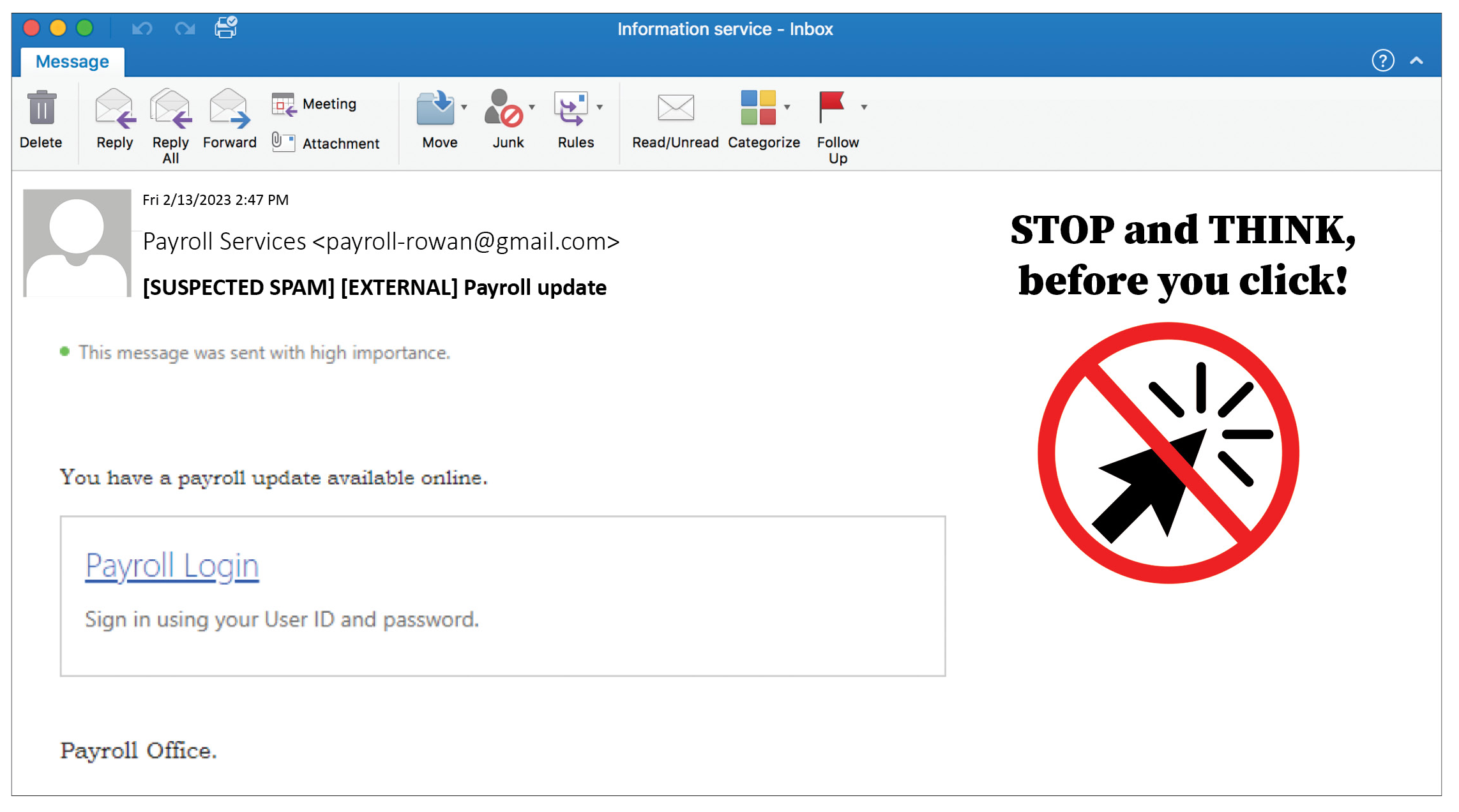
Then, you’ll be directed to a page that looks like the sign-on page you’re used to seeing for Rowan applications. Often, the only way you can spot a fake from the real thing is by carefully looking at the URL. The URL may include rowan.edu but start with a .net, .com or other domain, like xyz.com/rowan.edu/cas/login, as shown below. When you are logging in to applications protected by Rowan’s single sign-on service, the URL will always start with login.rowan.edu.
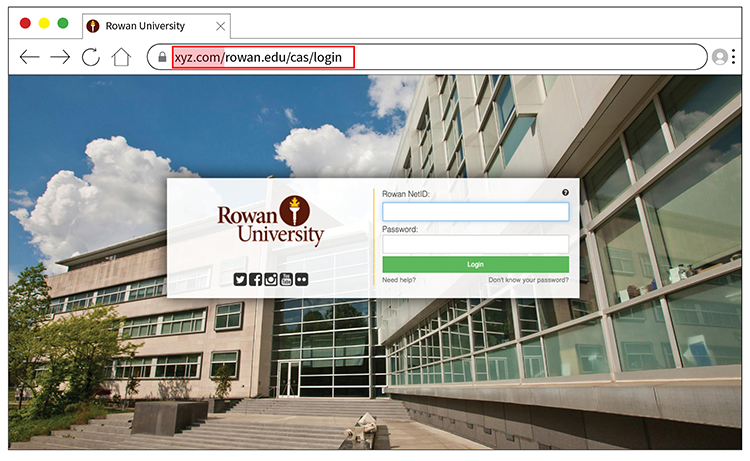
Once you provide your NetID and password in a fake login page, you may be redirected to another site, asking you to verify your identity through two-factor authentication. This page may appear similar to a legitimate Duo prompt, but will only offer one option: entering a passcode.
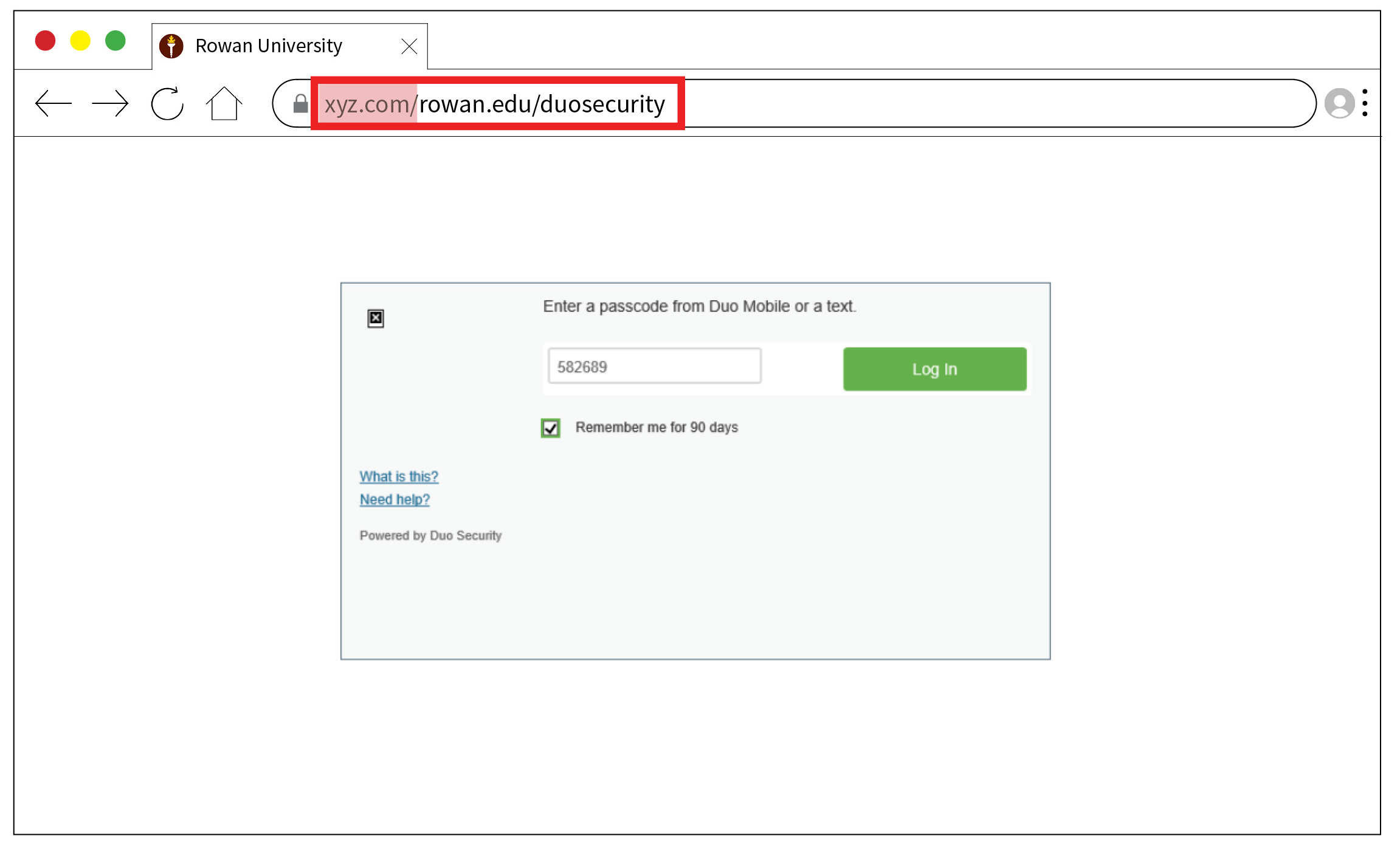
If you provide a passcode, the hacker now has everything they need to fully access your account: your Rowan NetID, password and a real Duo passcode to verify your identity.
You must be vigilant to protect your account. Always verify the URL before entering your NetID, password or Duo passcodes into a website.
Pay particular attention to the text between https:// and the next / in URLs: https://irt.rowan.edu/help is a legitimate Rowan University website, while https://irt.scam.com/rowan.edu/help is not.